
The Shaping Policy Profile section of a traffic policy sets the speed limits, data quotas and quota breach rates for the selected WAN tab. Click Shaping Policy Profile to expand the section, see figure below.
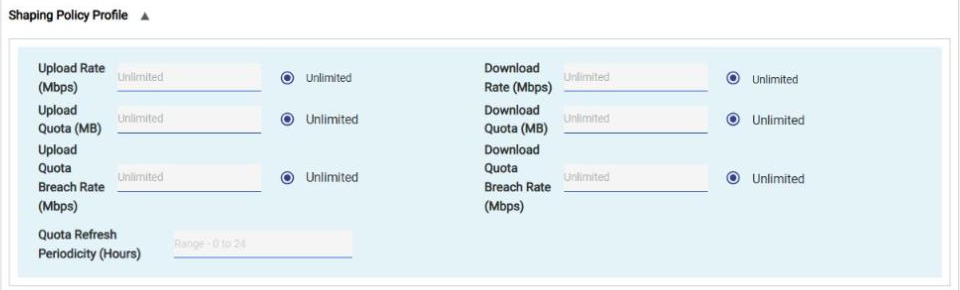
Each field has a text box and an Unlimited option. By default, Unlimited is selected and no limit is applied. To set a limit, enter the value in the text box. To remove the limit, select Unlimited. To enter data in the respective fields, refer the table below.
|
Field |
Description |
|---|---|
|
Upload Rate (Mbps) |
Maximum upload speed allowed for the policy on this WAN. |
|
Download Rate (Mbps) |
Maximum download speed allowed for the policy on this WAN. |
|
Upload Quota (MB) |
Amount of data that can be uploaded before the upload quota is exhausted. |
|
Download Quota (MB) |
Amount of data that can be downloaded before the download quota is exhausted. |
|
Upload Quota Breach Rate (Mbps) |
Upload speed applied after the upload quota is exhausted. It applies until the quota is refilled based on the Quota Refresh Periodicity. |
|
Download Quota Breach Rate (Mbps) |
Download speed applied after the download quota is exhausted. It applies until the quota is refilled based on the Quota Refresh Periodicity. |
|
Quota Refresh Periodicity (Hours) |
Time in hours after which the upload and download quotas are reset to the configured values. Enter a value from 0 to 24. |
Table Shaping Policy Profile
Copy To
To copy the traffic policy of a WAN, perform the following steps.
Steps
-
In the Copy To list at the top right of the Application Policy Profile section, select the WAN whose traffic policy is to be replaced by the policy of the current WAN tab.
-
The user can re-configure the replicated traffic policy.
-
Click Save.
A Reset button is available next to Copy To.