
When the EpicOS System is installed on the site, by default, the network level policy named ‘Default Network’ is pre-created in the system, but no device level traffic policies are present. The network level policy will be applicable under the Aggregate Traffic Policy of the Access Network and the device level policy will be applicable under the Device Traffic Policy.
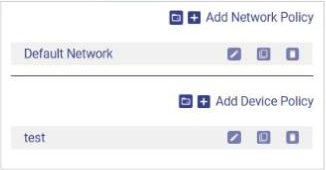
To open Traffic Policies, click SD-WAN in the side bar and select the Traffic Policies tab. The list on the left of the screen shows the network traffic policies at the top and the device traffic policies below them, see figure below.
-
Add Network Policy – Create a new network traffic policy. See Creating a New Network Traffic Policy.
-
Add Device Policy – Create a new device traffic policy. See Create Device Traffic Policy.
-
Upload Config from Backup (icon next to Add Network Policy and Add Device Policy) – Upload traffic policies from an available backup.
-
For each policy in the list:
-
Edit (pencil icon) – Open the policy to change it.
-
Copy Policy – Create a copy of the policy.
-
Delete (trashcan icon) – Delete the policy.
-