The Controllers section shows the status and performance of the modems and services connected to the EpicOS system, and provides the VoIP configuration.
To open a controller, click Controllers in the side bar and select the controller. The available controllers are also shown as tabs at the top of the Controllers screen. The tabs depend on the system configuration:
-
Starlink – One tab for each managed Starlink interface (for example, Starlink 1 and Starlink 2). See Starlink.
-
Cellular – Available only when a compatible external USB modem is connected. See LTE5G.
-
VoIP – VoIP (SIP PBX) service configuration. See VoIP.
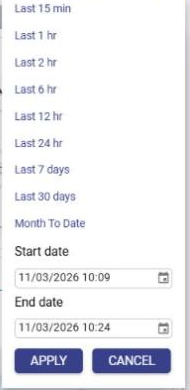
The time period of the controller charts is selected from the period drop-down at the top right of the Controllers screen. The available options are Last 15 min, Last 1 hr, Last 2 hr, Last 6 hr, Last 12 hr, Last 24 hr, Last 7 days, Last 30 days and Month To Date. To view a custom period, select the Start date and End date and click APPLY, or click CANCEL to close the list. By default, Last 1 hr is selected.