
To create a new Network Traffic Policy, perform the following steps.
Steps
-
Click the Traffic Policies tab under SDWAN. The Traffic Policies page appears, see figure below.
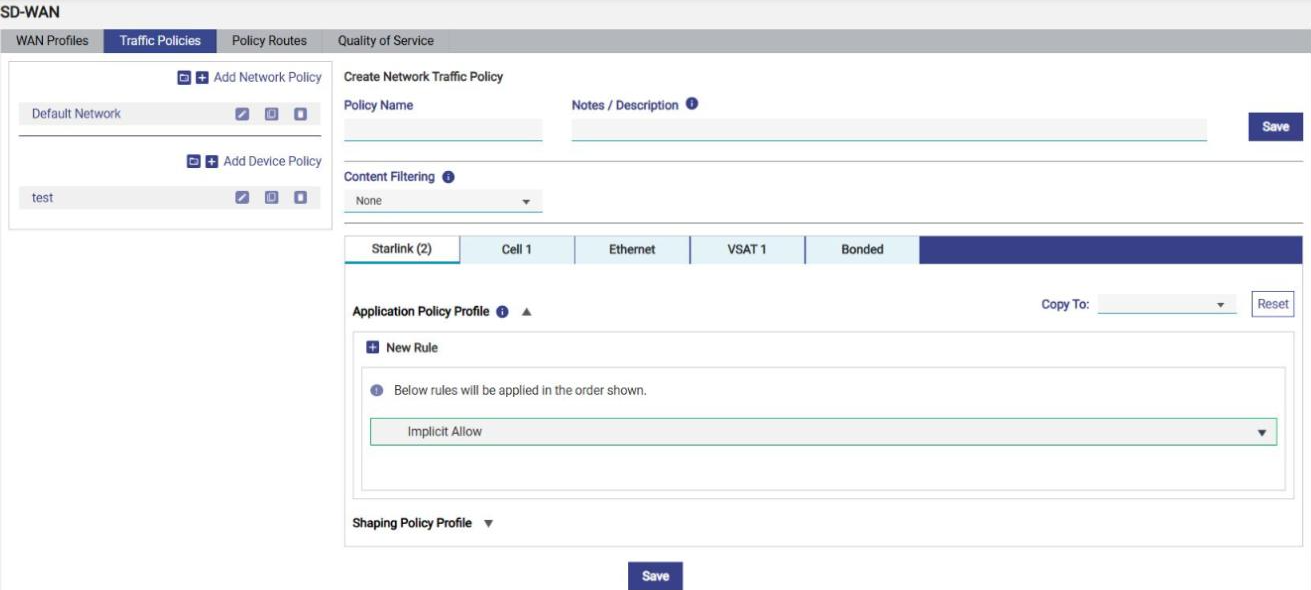
Initially, the Default Network is available. User can configure multiple traffic policies. Once, the traffic policies are configured, the traffic policies become available on the Traffic Policies page.
-
Click + Add Network Policy to create a new network traffic policy. The Policy Name field becomes available under the Create Network Traffic Policy section. To enter data in the respective fields, see table below.
|
Fields |
Description |
|
Policy Name |
Enter the name of the policy. |
|
Notes / Description |
Enter information about this traffic policy, such as its purpose or the networks it applies to (maximum 500 characters). Hover over the information (ℹ) icon next to the field for guidance. |
|
Content Filtering |
Select the content filtering to apply to this traffic policy: None, Adult, Malicious, Gambling, or Adult, Malicious & Gambling. By default, None is selected. For details, see Content Filtering. |
|
Select WAN Type |
Aliases of the Interfaces/WANs that are enabled on the Interfaces screen will appear here. Exception: If there are two or more Interfaces/WANs of the same technology, they will have common policy and will appear in a single tab with name same as the Interface/WAN type and the number of WAN in brackets (hover on the WAN will show the Interface Aliases of the Interfaces for which the policy is applicable). If there are Bonded Interfaces/WANs in any of the WAN profiles, there will be a Bonded tab. The policy under this tab will apply to traffic flowing through bonded links. |
|
Copy To / Reset |
Use Copy To (next to the Application Policy Profile of a WAN tab) to copy the policy of the selected WAN tab to another WAN tab. A Reset button is available next to Copy To. |
|
|
By default, the first Interface Alias will be selected. The tab can be any/all the below WAN types, depending on the number of WANs enabled in the system.
|
The Network Traffic Policy creation screen contains three sections namely,
-
Content Filtering
-
Shaping Policy Profile
-
Application Policy Profile