
Release Notes of 8.1.2 Build 151
Feature / Enhancements
-
Enhanced Blocking of BitTorrent Traffic - Further strengthens the detection and blocking of BitTorrent traffic passing through the Edge, preventing torrent traffic from bypassing configured Application Policies.
-
Faster Sync of CAN Admin Portal Configuration - Configuration changes made in the CAN Admin Portal are now synced to the Edge every 5 minutes, so updates take effect on the Edge much sooner.
Bug Fixes
-
Correction for “Copy To” field issue when updating Traffic Policy rules.
Release Notes of 8.1.2 Build 142
Feature / Enhancements
-
Web CLI Command for WireGuard Status - Adds a new
k4.debug.wireguardcommand to the Web CLI that displays the current running status of WireGuard along with the WireGuard client logs, simplifying troubleshooting of current and past VPN issues. -
Event Notifications for VPN Connection Status - Events are now generated whenever a VPN connection is established or disconnected, and these events are pushed to Kloud for monitoring and alerting.
-
Enhanced Blocking of BitTorrent Traffic - Improves suppression of BitTorrent traffic that uses port hopping to bypass DPI-based Application Policies. The system now detects clients that repeatedly switch ports while communicating with remote peers, and temporarily blocks traffic between the affected local and remote IP address pair.
-
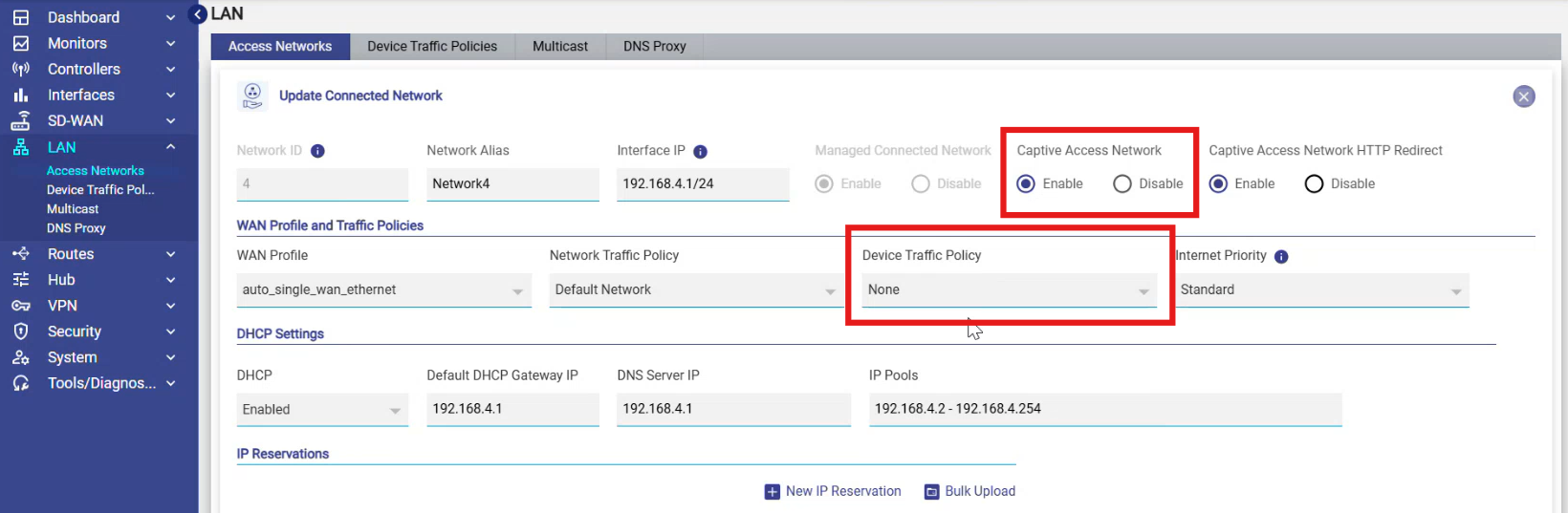
Device Traffic Policy for Captive Portal Networks - The Device Traffic Policy can now be configured for LAN networks that have Captive Portal enabled. This allows administrators to apply policies, such as usage quotas and speed limits, to devices that are connected to the network but have not yet authenticated through the Captive Portal.
Bug Fixes
-
Correction for performance charts after reboot – Fixed an InfluxDB-related issue where performance charts stopped plotting data after a system reboot.
-
Correction for decision service going inactive – In rare cases, the MongoDB instance on the Edge could become temporarily unreachable, causing the DPI decision service to throw an exception and go inactive. The service now retries the database query several times and, if MongoDB is still unreachable, abandons the transaction instead of failing.
Release Notes of 8.1.2
Feature / Enhancements
-
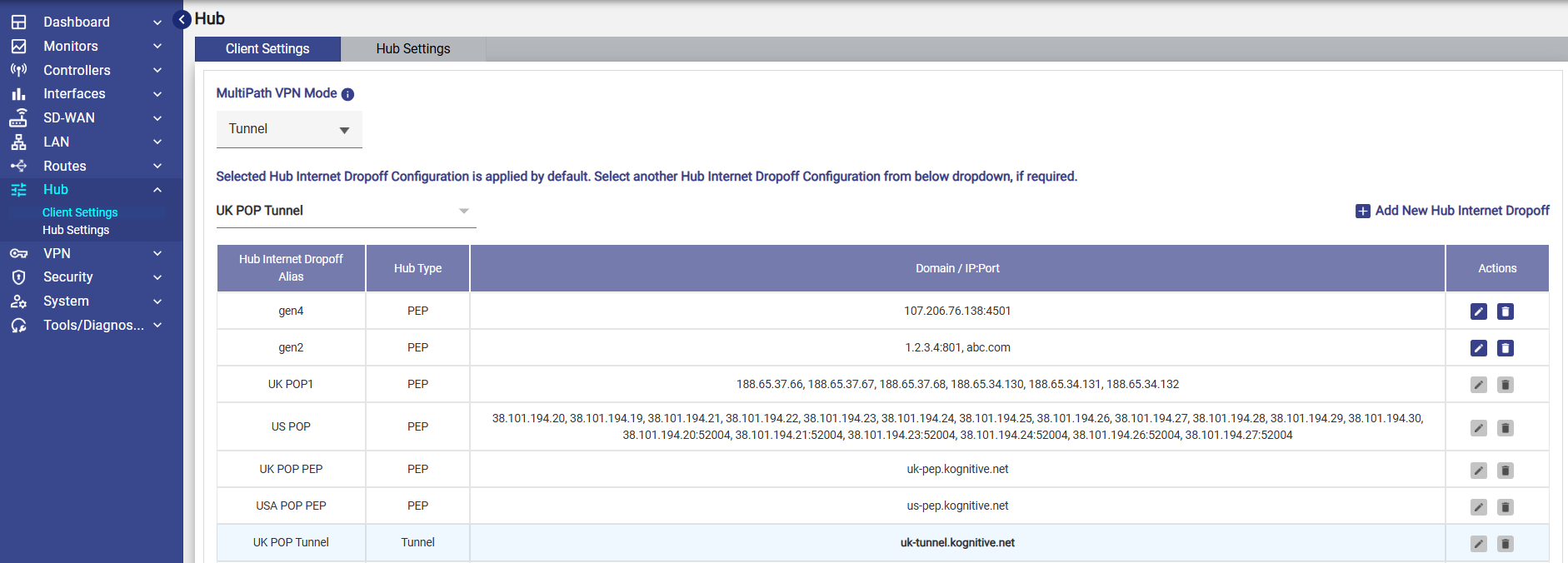
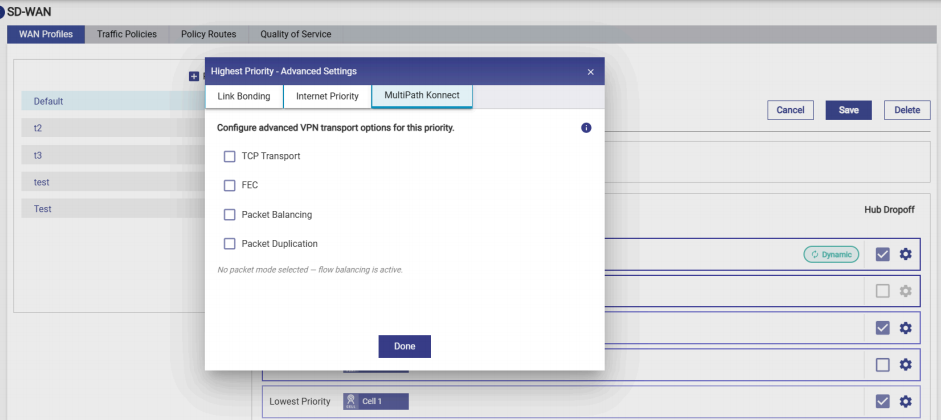
Hub with MPK Tunnel Support - Introduces MPK Tunnel support on Edge using Gen4 MPK, delivering higher throughput compared to the previous PEP mode. Flow balancing is supported for both transport types, while UDP additionally supports packet balancing, packet duplication, and Forward Error Correction (FEC).
-
Please refer the following link to view the Guide: MultiPath Konnect (MPK) Tunnel Support more information.
-
Note: Following an upgrade, existing deployments will continue to operate in PEP mode. However, the system is preconfigured with Tunnel mode enabled for Public Hubs, allowing administrators to switch to Tunnel mode when required.
-
-20260716-082954-20260804-125137.png?cb=e276f1196c4288b1a91b8fb552441210)
-
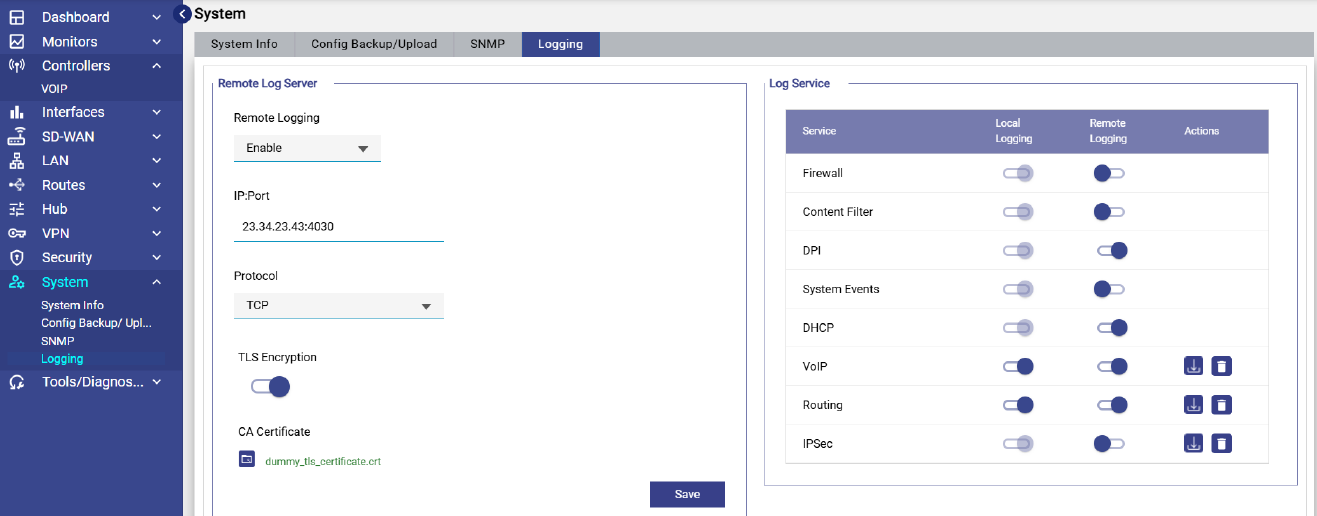
SIEM - Remote Syslog Support - Adds support for forwarding system logs to a remote Syslog server over UDP or TCP, with optional SSL encryption for secure TCP-based log transmission.
-
Logging Enhancements - Introduces centralized log management with options to clear/reset logs and manage logging from a single screen.
-
Please refer the following link to view the online help - Logging.
-
-
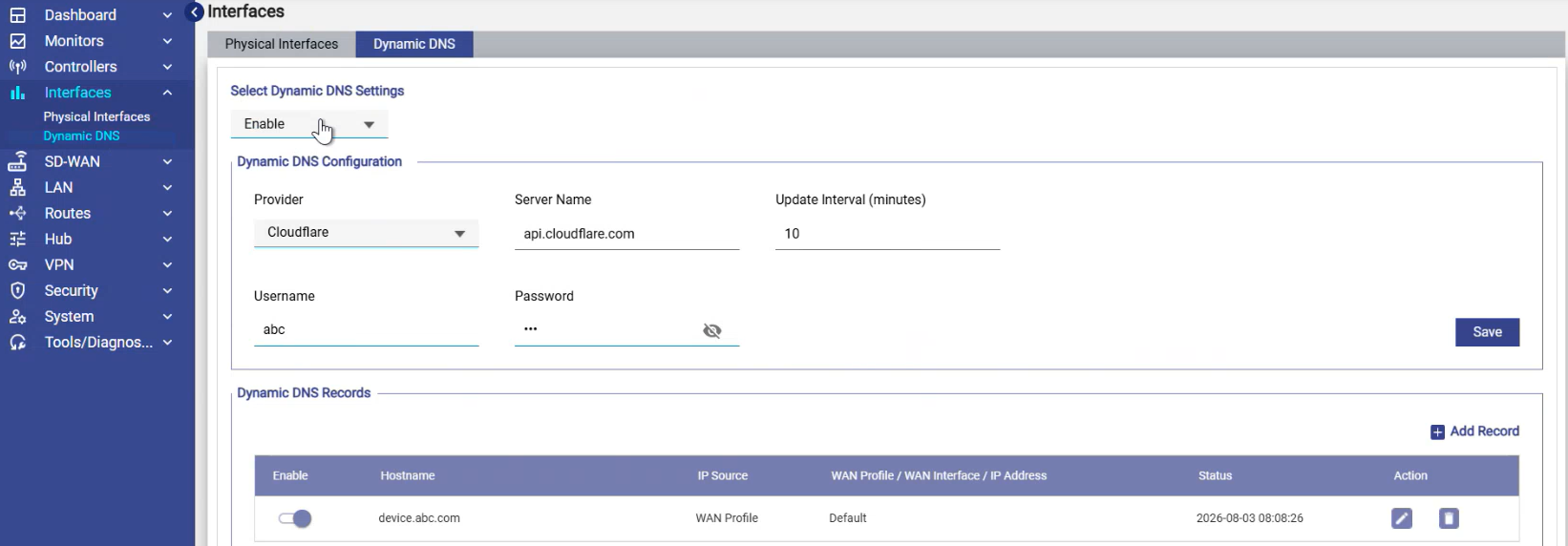
Dynamic DNS - Introduces Dynamic DNS (DDNS) service that automatically updates a domain name's DNS record to point to a changing (dynamic) public IP address, allowing users to reach home or small-business services (like VPNs, CCTV, or web servers) using a fixed hostname. It also enables Hubs to be accessed using a fixed Fully Qualified Domain Name (FQDN), eliminating the dependency on a static public IP address.
-
DDNS Configuration - The DDNS feature is configured under the Interfaces section of the GUI. The configuration is divided into two sections: Global Configuration and DDNS record configuration.
-
Global Configuration: The global configuration controls the overall DDNS feature settings:
-
Enable/Disable: Toggles the DDNS feature on or off for the device.
-
DDNS Server: Selects the DDNS service provider used by your organization. Built-in providers include Cloudflare, No-IP, and Dynu. For a different provider, select Other and enter the server name manually. When a built-in provider is selected, the server name is populated automatically.
-
Update Interval: How frequently DDNS updates are published. The default is 10 minutes.
-
Username / Password: Credentials used to authenticate with the DDNS server.
-
-
DDNS Record Configuration: The record configuration section contains one entry per service to be advertised via DDNS. For example, a camera service on an Edge device could be registered as
camera.edge.com. Each record maps a hostname to an IP address. There are three options for how the IP is determined:-
Static IP: Use when the WAN IP is fixed and does not change. The IP address is entered directly in the configuration. This configuration can be used in DMZ networks where the WAN is configured with private IP and an external public IP is advertised to resolve the DNS domain.
-
WAN Interface: Use when the WAN interface receives its IP via DHCP. The current IP assigned to the specified WAN interface is published and updated dynamically as it changes. For example: the WAN interface gets a public IP from the Starlink network.
-
WAN Profile: Use when the service is associated with a WAN profile that uses priority based links. The IP published corresponds to the active link through which traffic is currently flowing within that WAN profile.
-
-
-
-
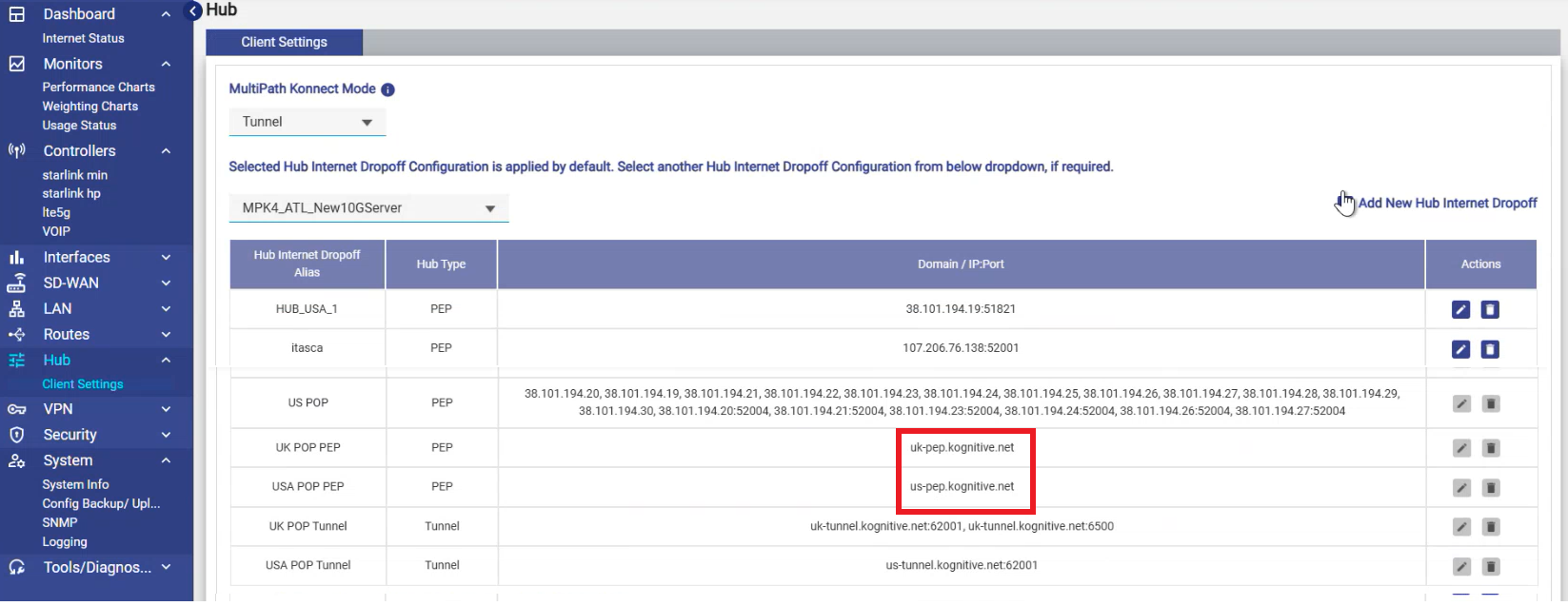
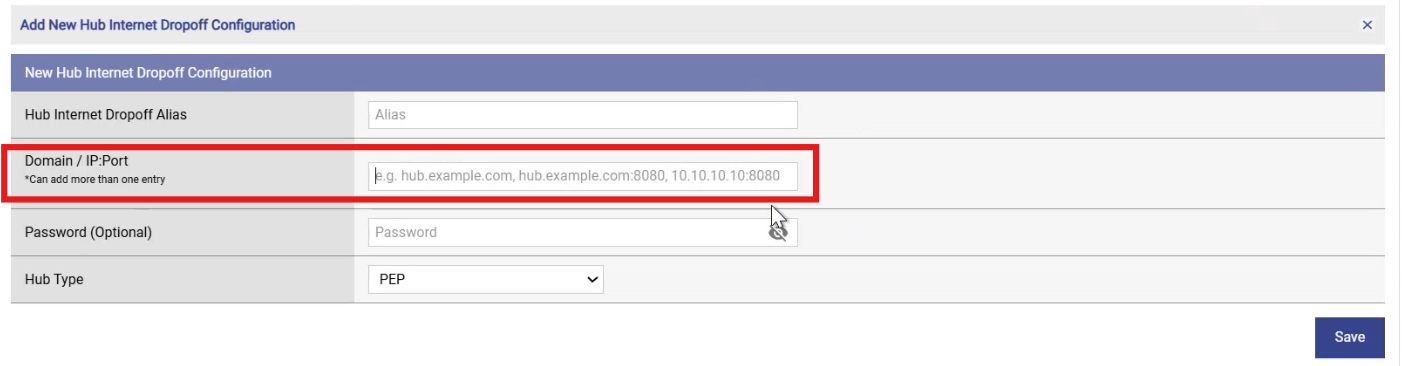
DNS for Hub IPs - Adds support for using Fully Qualified Domain Names (FQDNs) instead of static IP addresses for Hub Internet Drop-off (POP IP) configurations.
-
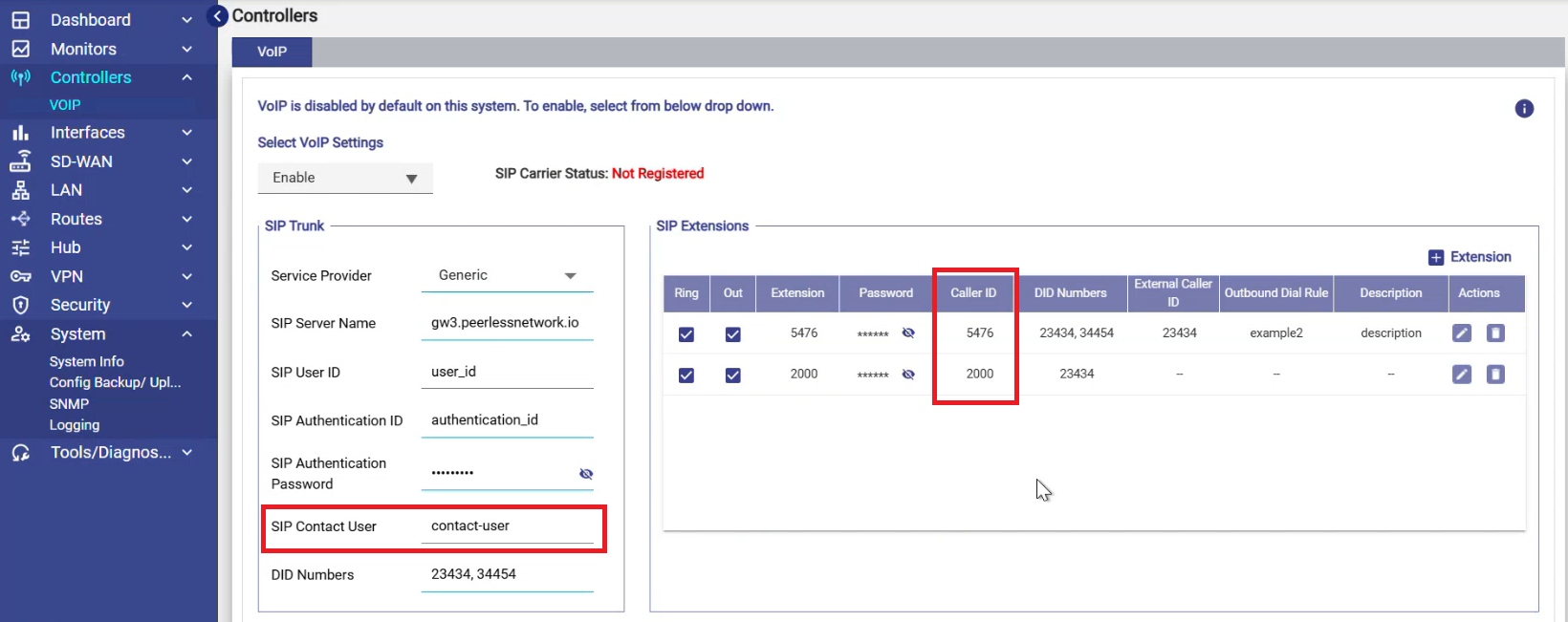
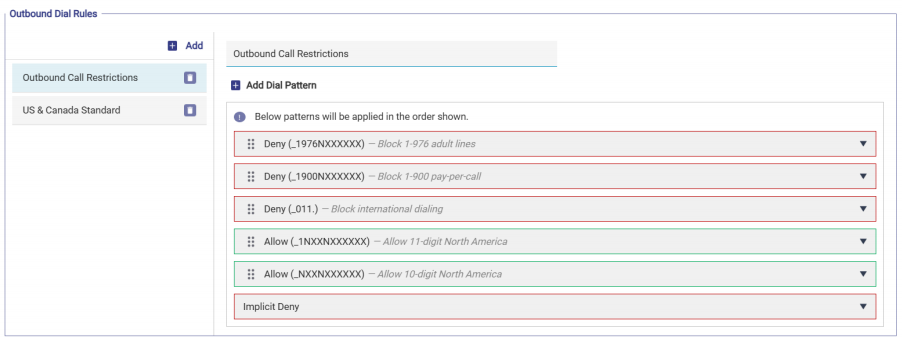
VoIP Enhancements - Enhances VoIP functionality with improved DID and CID support, outbound dialing restrictions, and a redesigned dial-plan implementation for improved clarity and reliability.
-
Please refer the following link to view the online help - VoIP.
-
-
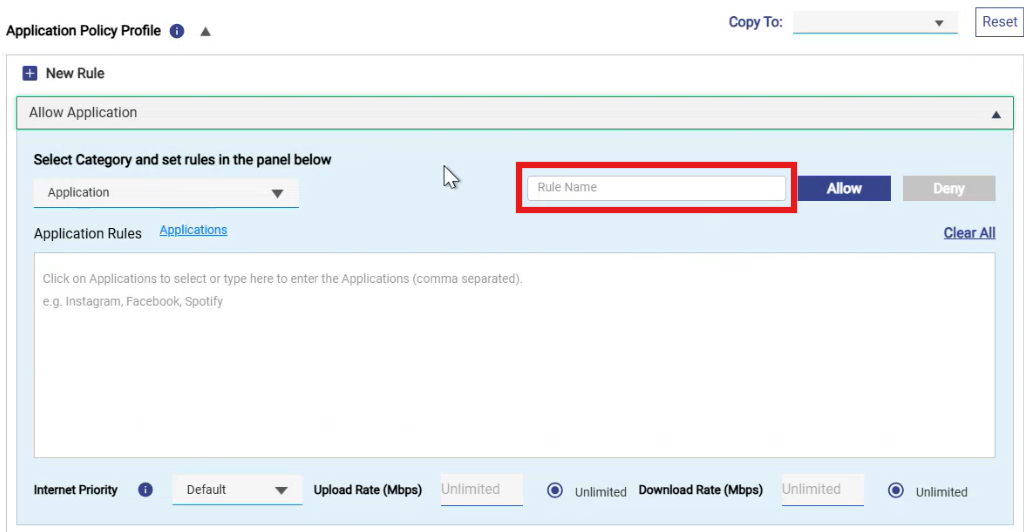
Traffic Policy Rule Descriptions - Adds a Description field for Traffic Policy rules, allowing administrators to document the purpose of individual Application Policy rules.
-
Independent CAN User Portal Package - CAN User Portal updates can now be deployed independently of Edge software releases, simplifying maintenance and feature updates.
-
Multiplan Support - Introduces Multi-Plan support, allowing administrators to assign multiple plans to a single user account so users can maintain multiple active plans simultaneously. Please refer the following link to view how this can be configured:
-
Captive Portal Login Improvements - The Captive Portal login page now automatically selects the Terms & Conditions and Remember Me options to simplify user sign-in.
-
Epic Pro Firewall and EdgeServer Configuration Compatibility - Configuration backups can now be restored between Epic Pro Firewall systems to Epic Pro2 Firewall systems, simplifying migration across supported systems.
-
Konnect End point Auto configuration - Adds automatic transport switching between UDP and TCP when the active Konnect transport becomes unavailable or blocked. For example, if a customer firewall blocks UDP traffic, Konnect automatically switches to TCP to maintain connectivity, and switches back when UDP is available.
-
Unmanaged network usage accounting – Usage generated from unmanaged access networks is now correctly accounted. For example, devices connected to an unmanaged access network will now display their bandwidth consumption correctly in the Usage screen.
Bug Fixes
-
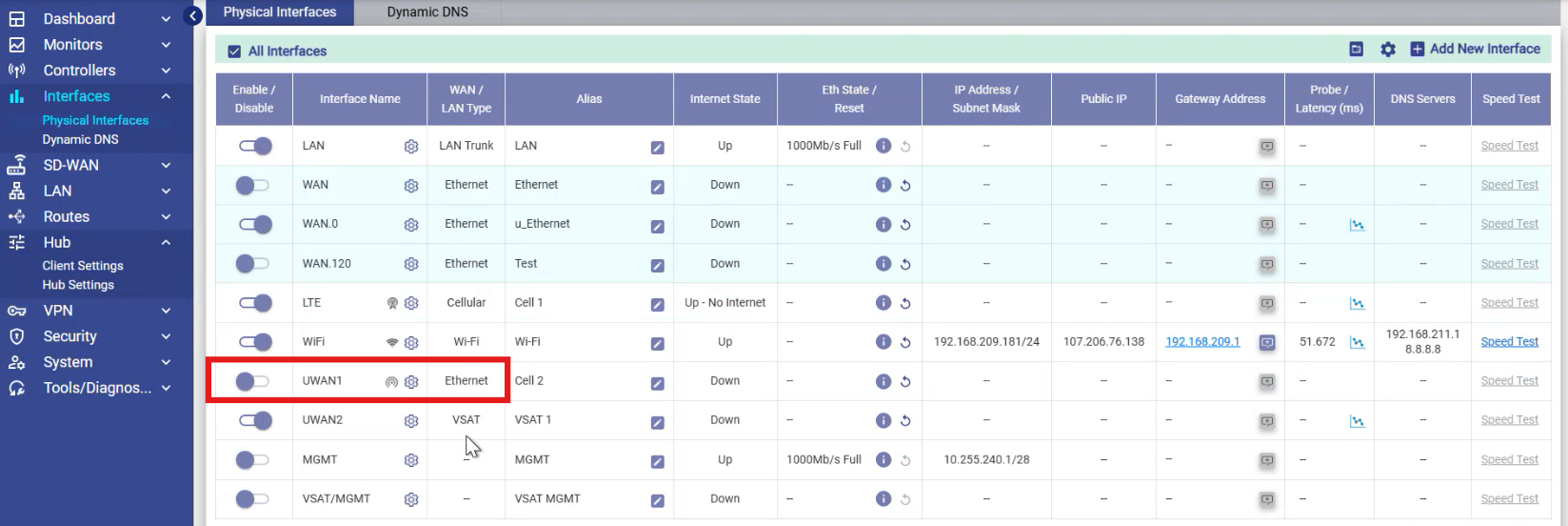
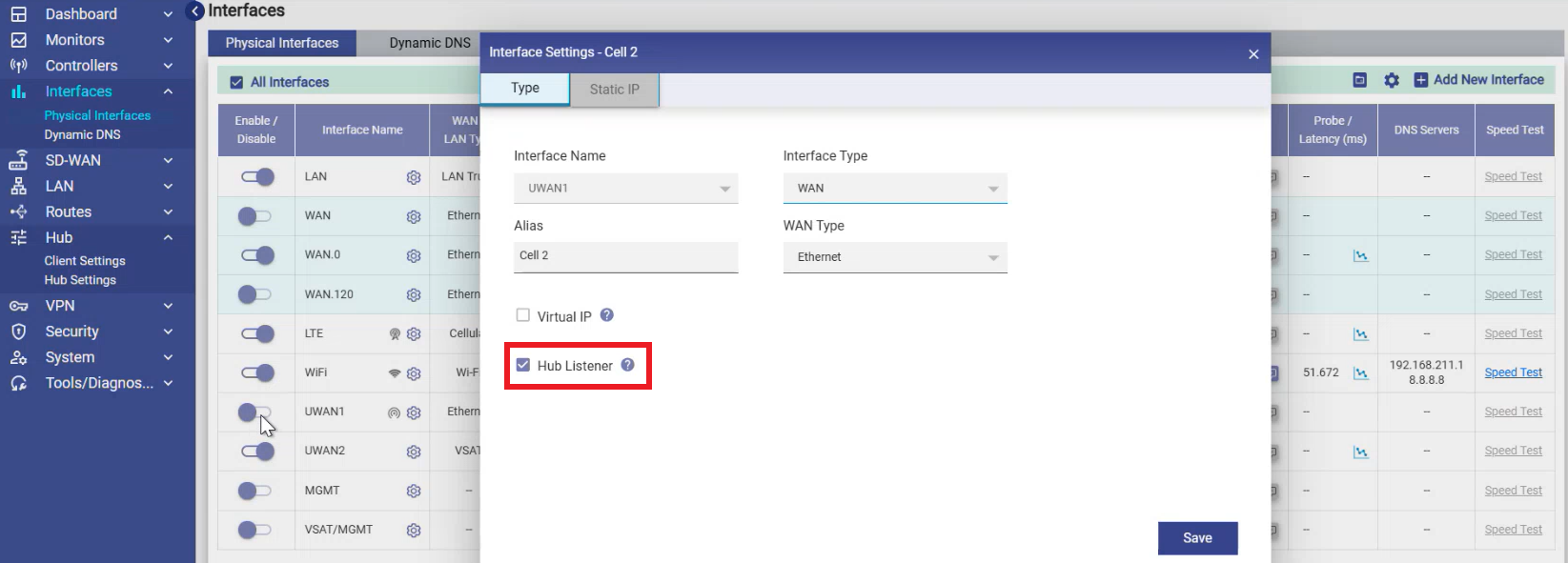
MPK Hub listener – Added support to enable or disable the Hub Listener for Ethernet WAN interfaces in the Default WAN Profile (when the interface is inactive). Dedicated Hub listening interfaces are now isolated within the MPK Hub networking environment, improving Konnect Hub performance.
-
Correction for MPK traffic disruption – Fixed an issue where tunnels could enter an invalid state following a disconnection event.
-
Correction for CAN user identification visibility – Resolved an issue where CAN user identification was not displayed correctly on the Usage screen.
-
InfluxDB stability and maintenance improvements:
-
Fixed excessive disk usage caused by missing InfluxDB retention policies.
-
Improved InfluxDB recovery to ensure usage statistics continue to be reported correctly after database recovery.
-
Resolved issues affecting usage statistics collection under certain InfluxDB conditions.
-
-
Usage reporting and analytics improvements
-
Fixed an issue where 7-day usage reports did not display DPI analytics data.
-
Resolved multiple issues that could prevent usage statistics from being collected or displayed correctly.
-
Improved usage accounting and policy enforcement for rapid port-hopping traffic patterns, ensuring accurate usage reporting during DoS-like scenarios.
-
-
Correction for untagged network visibility – Untagged networks are now displayed correctly even when usage is zero. The Untagged Network is now displayed with a unique color and the tooltip "Untagged Network" when it has non-zero usage. It is hidden from the Top Networks section when its usage is zero.
-20260804-181723.png?cb=2c4d00078c21173125557c34867731ff)
-
DPI Analytics enhancement – DPI Analytics now reports traffic for all IP protocol types, including ICMP, ESP, GRE, and other IP protocols.
-
Correction for Gen2 socket utilization – Enhanced firewall handling to prevent unnecessary inbound TCP connections from increasing Gen2 socket usage.
-
Correction for Hub probe handling – Added support for processing probe traffic correctly when NAT is disabled on Hub deployments.
-
Correction for Konnect TCP reconnection – Fixed an issue where the TCP bridge was not restarted after a connection interruption.
-
Correction for account password reset – Resolved issues affecting account password reset functionality.
-
Correction for ICMP and IP protocol blocking – Extended Application Policy support to block ICMP, GRE, ESP, and other IP protocol traffic in addition to TCP and UDP.
-
Correction for VM upgrade failure – Resolved an issue where virtual machine upgrades could occasionally become stuck during the upgrade process.
-
Correction for PMTU handling – Resolved an issue where incorrect effective Path MTU settings could result in packet loss over UDP tunnel sessions.
-
Correction for Inbound NAT editing – Fixed an issue that prevented existing NETMAP-based Inbound NAT rules from being updated.
-
Correction for BGP service updates – Fixed an issue where editing an existing BGP service could fail with an "Error in Updating Service Routes" message.
-
Correction for Route Prefix advertisement – Fixed an issue where Route Prefixes outside the WAN interface subnet were not advertised to BGP neighbors.