
Overview
Single Sign-On (SSO) allows users to securely access the EpicLink platform using their organization’s identity provider (Okta or Azure). With SSO, users do not need a separate username and password for the application.
SSO Login Workflow
Step 1: Open the Login Page
-
Navigate to the EpicLink login page
-
The screen displays:
-
Conventional login credentials
-
Sign in with SSO button
-
-
Select the Sign in with Single Sign-On button.
-20260529-111008.png?cb=ab7152975f227f4ba6c77efc54ecdfbd)
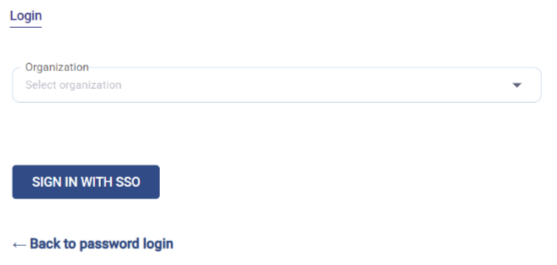
Step 2: Enter Organization Name
-
Select the Organization from the dropdown menu.
-
Click the SIGN IN WITH SSO button.
Step 3: Redirect to Okta/Azure Login
-
You will be redirected to the Okta/Azure sign-in page.
-
Enter the Username (email address).
-
Click Next.
-20260529-111508.png?cb=6fea14a597c8941221eec0a4df879595)
Step 4: Complete Authentication
Depending on your organization’s security settings:
Option A: Password Authentication
-
Enter your password (if prompted)
-20260529-111934.png?cb=00c63f5c055077db7833534b0e4a6e21)
Option B: Multi-Factor Authentication (MFA)
-
You may be asked to verify your identity
-
Example (as shown in the screen):
-
Enter the verification code from the Verification app
-
Click Verify.
-
-20260529-112058.png?cb=b6bf18d43663cc7861a1168ff0423e4b)
Step 5: Access the Application
-
After successful authentication:
-
You are automatically redirected back to EpicLink.
-
You are logged into the application.
-
Summary
-
The workflow followed for SSO login is:
-
Enter organization → Click SSO → Login via Okta/Azure → Complete verification → Access the application.
-
SSO Login Workflow - Whitelabeled Clients
-
Customers who use a whitelabeled login URL and have SSO enabled are directly redirected to the SSO login screen when they attempt to sign in.
-
In this case, the Organization field is automatically populated, and no manual selection is required.
-
Click SIGN IN WITH SSO to proceed.
-20260529-110514.png?cb=61cc54110c2d8a8d93c44d2e947bc52d)
-
All subsequent steps remain the same as described in the standard SSO login workflow above.