
Overview
The QoS (Quality of Service) Rules tab allows you to control and prioritize network traffic by defining bandwidth limits and traffic handling policies. This helps ensure critical applications receive sufficient bandwidth while preventing congestion from non-essential traffic.
To access QoS Rules:
Dashboard → Firewall → QoS Rules
You will see:
-
A table listing configured QoS rules
-
An “+ Add QoS Rule” button to create new rules

QoS Rules Table
The table displays all configured rules with the following columns:
-
Rule # - Unique identifier for each rule
-
Rule Name - Name assigned to the QoS rule
-
Protocol - Network protocol (TCP/UDP/Any)
-
Source Interface - Incoming interface (LAN/WAN/etc.)
-
Source IP / Subnet - Source IP or subnet
-
Source Port - Source port(s)
-
Destination Interface - Outgoing interface
-
Destination IP / Subnet - Destination IP or subnet
-
Destination Port - Destination port(s)
-
Type - QoS type or classification
-
Actions - Edit/Delete options
Adding a QoS Rule
-
Click “+ Add QoS Rule” to open the configuration dialog.
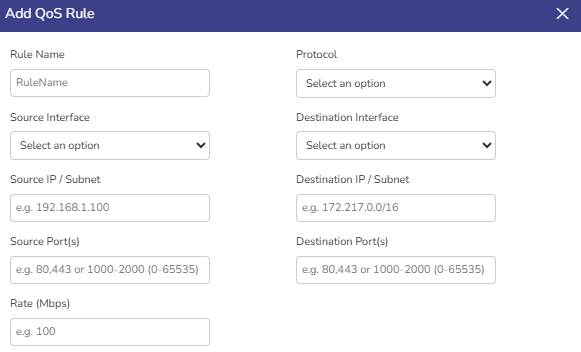
Fields Explanation
Basic Details
-
Rule Name
-
Custom name for identification
-
Example:
VideoStreamingLimit
-
-
Protocol
-
Select protocol:
-
TCP
-
UDP
-
Any
-
-
Traffic Matching Criteria
-
Source Interface
-
Interface where traffic originates (e.g., LAN, WAN)
-
-
Destination Interface
-
Interface where traffic is headed
-
-
Source IP / Subnet
-
Define specific IP or subnet
-
Example:
-
192.168.1.100(single IP) -
192.168.1.0/24(subnet)
-
-
-
Destination IP / Subnet
-
Target IP or subnet
-
Example:
172.217.0.0/16
-
Port Configuration
-
Source Port(s)
-
Single port:
80 -
Multiple ports:
80,443 -
Range:
1000-2000 -
Full range:
0-65535
-
-
Destination Port(s)
-
Same format as source ports
-
Bandwidth Control
-
Rate (Mbps)
-
Defines maximum bandwidth allowed for this rule
-
Example:
100= 100 Mbps limit
-
-
Click Save / Apply button.
-
The rule will appear in the QoS Rules table.
-
In the Actions column:
-
Edit → Modify rule parameters
-
Delete → Remove the rule
-
-
Rules are evaluated based on their order (top-down priority)
-
First matching rule is applied
-
More specific rules should be placed above general ones