
Overview
The Identity Rules tab allows you to define bandwidth policies based on user identity or profiles rather than just IP/port-based matching.
This is especially useful for:
-
Assigning bandwidth per user group (e.g., employees, guests)
-
Controlling WAN usage dynamically
-
Managing multi-WAN bandwidth distribution (e.g., 5G, Starlink)
To access Identity Rules:
Dashboard → Firewall → Identity Rules
You will see:
-
A list of existing identity rules (left panel)
-
A configuration panel to create/edit rules
-
A “+ Add Rule” button
Identity Rules Panel
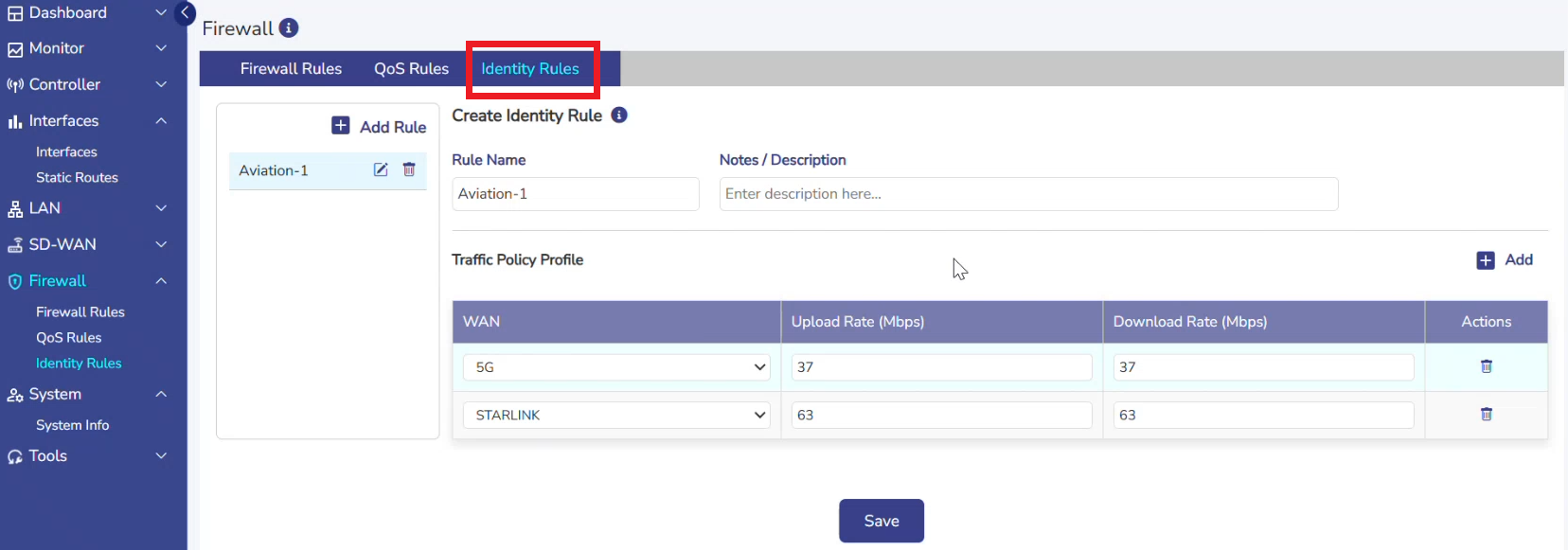
Left Panel
Displays existing rules:
-
Rule name (e.g., Aviation-1)
-
Options to:
-
✏️ Edit
-
🗑 Delete
-
Creating an Identity Rule
Click “+ Add Rule” to create a new identity-based policy.
Basic Details
-
Rule Name
-
Unique identifier for the rule
-
Example:
EmployeePolicy
-
-
Notes / Description
-
Optional field to describe the rule purpose
-
Example:
Bandwidth allocation for office staff
-
Traffic Policy Profile
This is the core section where bandwidth is assigned per WAN.
Table Columns
|
Column |
Description |
|---|---|
|
WAN |
Select WAN interface (e.g., 5G, Starlink) |
|
Upload Rate (Mbps) |
Max upload bandwidth allowed |
|
Download Rate (Mbps) |
Max download bandwidth allowed |
|
Actions |
Remove WAN entry |
Adding WAN Policies
Click “+ Add” to assign bandwidth for a WAN interface.
Fields Explanation
-
WAN
-
Select the WAN interface
-
Example:
-
5G
-
Starlink
-
-
-
Upload Rate (Mbps)
-
Maximum upload speed allowed for this identity
-
Example:
37
-
-
Download Rate (Mbps)
-
Maximum download speed allowed
-
Example:
63 -
Click Save.
-
The rule will be stored and applied.
-
Removing WAN Policy
-
Click 🗑 icon in the Actions column to delete a WAN entry.
-
-
Identity rules are applied based on user or identity mapping (backend/auth integration)
-
Each rule defines:
-
Bandwidth per WAN
-
Upload & download limits
-
-
If multiple WANs exist:
-
Each WAN can have independent limits
-